In the fast-paced landscape of digital advertising staying ahead of the curve is essential. Meta Ads formerly known as Facebook Ads continue to be a powerful tool for businesses looking to reach their target audience effectively. To ensure your advertising campaigns are a resounding success in 2023 and beyond, we’ve compiled a detailed guide on Meta Ads Best Practices.
Meta Ads Best Practices 2023
Understanding the Meta Ads Ecosystem
The Meta Ads ecosystem is a multifaceted platform that includes Facebook, Instagram and the Audience Network. Each of these platforms has its strengths and unique audience demographics. Understanding these nuances is vital to crafting successful ad campaigns. Facebook, for example, is ideal for reaching a wide range of users, while Instagram excels in visual content engagement. The Audience Network extends your reach beyond the platform to various partner websites and apps. By comprehending the intricacies of each platform, you can tailor your ad content and targeting for optimal results.
Crafting Engaging Ad Copy
Creating compelling ad copy goes beyond simply describing your product or service. It involves storytelling and establishing an emotional connection with your audience. Effective ad copy should address your audience’s pain points and offer solutions. Additionally, incorporating a compelling call-to-action (CTA) can significantly boost conversion rates. Consider using A/B testing to determine which ad copy resonates best with your target audience.
Leveraging Visual Content
Visual content is a cornerstone of successful Meta Ads. High-quality images and videos capture users’ attention in a crowded online environment. When selecting visuals, ensure they align with your brand identity and message. Striking a balance between eye-catching creativity and relevance is key. Conduct audience research to understand the type of visuals that resonate most with your target demographic.
Audience Targeting Strategies
Precise audience targeting is essential for optimizing ad spend and maximizing ROI. Meta Ads offer an array of targeting options, including demographics, interests, behaviors, and even custom audiences. Start by defining your ideal customer personas and then tailor your targeting parameters accordingly. Regularly monitor and adjust your targeting strategies as your campaign progresses to ensure you’re reaching the right audience.
Ad Budget Allocation
Strategically allocating your ad budget can make or break your campaigns. Begin by setting clear campaign objectives and determining your maximum budget. Allocate your budget across various platforms and campaigns based on performance data and goals. Be prepared to reallocate funds as needed to optimize high-performing campaigns and pause or adjust those that underperform.
A/B Testing for Optimization
A/B testing involves creating two variations (A and B) of your ad elements, such as headlines, visuals, or CTA buttons. By comparing the performance of these variations, you can identify which elements resonate most with your audience. Continuously testing and optimizing your ad components can lead to improved click-through rates (CTR) and conversions. Implement A/B tests with clear hypotheses, and use the results to refine your ad content.
Ad Scheduling and Frequency
Determining when your ads are displayed and how often they appear is critical. Ad scheduling allows you to reach your audience at optimal times when they are most active and receptive to your message. Ad frequency capping ensures that users are not bombarded with the same ad, which can lead to ad fatigue. Strike a balance between visibility and annoyance by carefully configuring your ad scheduling and frequency settings.
Mobile Optimization
Mobile optimization is non-negotiable in today’s digital landscape. With the majority of users accessing social media platforms via mobile devices, ensuring your ads are mobile-friendly is imperative. Mobile optimization includes using responsive design, creating concise ad copy, and selecting visuals that are easily viewable on smaller screens. Additionally, consider mobile-specific ad formats and placements to maximize your reach on mobile devices.
Ad Placement Strategies
Meta Ads offer various placement options, including in-feed, Stories, and right-hand column ads. Each placement has its unique advantages and audience interactions. In-feed ads seamlessly integrate into users’ feeds, providing a native experience. Stories ads are immersive and engaging, capitalizing on users’ propensity for vertical scrolling. Right-hand column ads are visible on desktop and can effectively capture users’ attention. To optimize your campaign, consider the objectives of your ads and choose placements that align with your goals.
Ad Creative Guidelines
Staying compliant with Meta’s ad creative guidelines is crucial to prevent ad disapproval. These guidelines cover various aspects, including image and video specifications, text-to-image ratios, and prohibited content. Ensure your ad creative meets these guidelines to maintain a smooth ad approval process.
Analytics are your compass in the world of Meta advertising. Track key performance indicators (KPIs) like CTR, conversion rate, ROAS, and ad reach. Analyze these metrics to gain insights into the effectiveness of your campaigns. Use the data to make data-driven decisions, optimize underperforming campaigns, and scale successful ones.
Privacy Compliance
As privacy regulations evolve, it’s essential to stay compliant with Meta’s privacy tools and best practices. These tools allow you to manage user data responsibly and obtain necessary consents. Ensure that your ad campaigns adhere to data privacy regulations, which may vary by region and jurisdiction. Failure to comply can lead to ad disapproval and legal consequences.
Remarketing Strategies
Remarketing, also known as retargeting, is a powerful strategy to re-engage users who have previously interacted with your brand. Implement dynamic remarketing to show users personalized ads based on their past actions on your website or app. By keeping your brand top-of-mind, you can increase the chances of conversion among this highly targeted audience.
Ad Quality and Relevance
To ensure your ads perform well, focus on ad quality and relevance. Meta’s algorithms prioritize ads that resonate with users and provide a positive experience. Strive to create ad content that aligns with users’ interests and preferences, and regularly review and update your creative to maintain relevance.
Creative Testing and Optimization
Continuous creative testing is essential to find the winning combination that resonates with your audience. Beyond A/B testing, consider multivariate testing, where you experiment with multiple ad elements simultaneously. This approach allows you to discover complex interactions between different creative elements and make data-driven decisions to enhance your ad performance.
Scaling Your Campaigns
Scaling successful ad campaigns is a pivotal step in maximizing your advertising efforts. As you identify high-performing campaigns, consider increasing your budget, expanding your targeting, or exploring new ad formats. Scaling requires careful monitoring to ensure consistent performance and return on investment.
Ad Policy Compliance
Adherence to Meta’s ad policies is non-negotiable. These policies are in place to maintain a safe and trustworthy advertising environment. Familiarize yourself with these policies and regularly review them to ensure your ads comply. Failure to do so can result in ad disapproval, account suspension, or other penalties.
How Can We Help?
Need help Advanced Meta ads Management Services for your Business Growth? Contact us and let’s discuss about effective Meta Ads marketing strategy that will take your business to the next level!
Related Blog
2026-05-12
Uncategorized
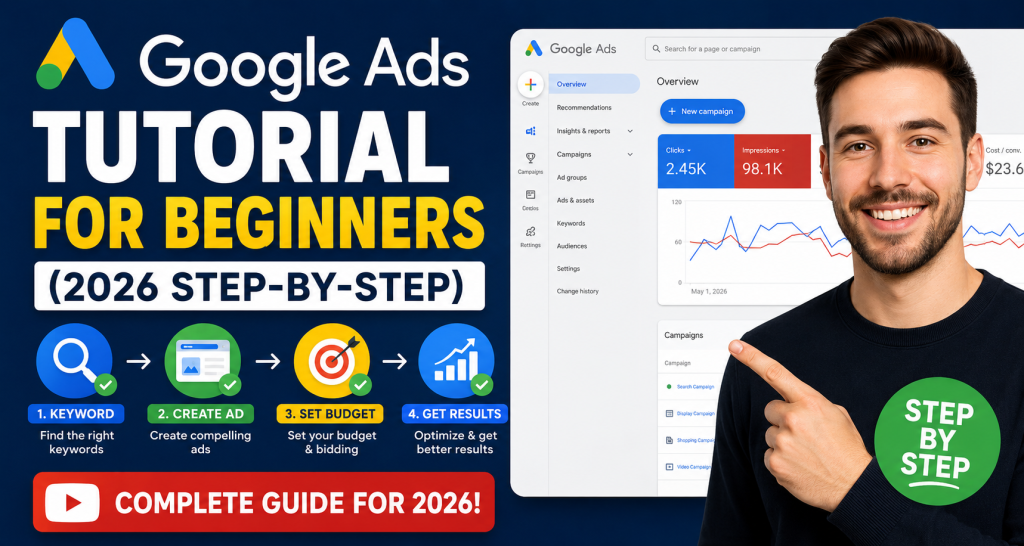
Google Ads Tutorial for Beginners (2026 Step-by-Step)
Google Ads Tutorial for Beginners (2026 Step-by-Step)
Google Ads remains one of the most powerful digital marketing platforms in 2026. Whether you are a business owner, freelancer, marketer, or beginner trying to generate leads and sales online, learning Google Ads can help you grow faster than almost any other marketing channel.
The best part? You do not need to be a marketing expert to start.
In this beginner-friendly Google Ads tutorial, you will learn exactly how to create your first successful campaign step by step — even if you have never used Google Ads before.
What is Google Ads?
Google Ads is Google’s online advertising platform that allows businesses to show ads on:
Google Search
YouTube
Google Maps
Gmail
Millions of partner websites
Businesses use Google Ads to:
Generate leads
Increase website traffic
Get phone calls
Drive online sales
Build brand awareness
Unlike traditional advertising, Google Ads allows you to target people who are actively searching for your services.
For example:
A plumber can target “emergency plumber near me”
A dentist can target “teeth whitening service”
An eCommerce store can target “buy running shoes online”
This is why Google Ads delivers high-intent traffic.
Why Google Ads is Important in 2026
Digital competition is increasing every year. SEO is powerful, but it takes time. Social media marketing can be unpredictable.
Google Ads gives businesses immediate visibility.
Here are some reasons why Google Ads is still dominating in 2026:
1. Instant Traffic
Your website can appear on Google within hours after launching a campaign.
2. High Buying Intent
Users searching on Google are usually ready to take action.
3. Advanced AI Optimization
Google’s AI bidding and audience targeting have become much smarter in 2026.
4. Budget Control
You can start with as little as $5–$10 per day.
5. Measurable Results
Every click, conversion, and lead can be tracked.
Types of Google Ads Campaigns
Before creating your campaign, it is important to understand the major campaign types.
Search Campaigns
These text ads appear on Google search results.
Best for:
Lead generation
Local services
High-intent keywords
Example: “Best roofing company near me”
Display Campaigns
Image ads shown on websites and apps.
Best for:
Brand awareness
Retargeting
Video Campaigns
Ads shown on YouTube.
Best for:
Brand visibility
Product promotions
Shopping Campaigns
Product listings with images and prices.
Best for:
eCommerce stores
Performance Max Campaigns
AI-powered campaigns that run across all Google properties.
Best for:
Scaling campaigns
Multi-channel advertising
For beginners, Search Campaigns are usually the best place to start.
Step-by-Step Google Ads Tutorial for Beginners
Now let’s build your first campaign.
Step 1: Create a Google Ads Account
Visit the official Google Ads website and sign in with your Google account.
Click: “Start Now”
Google may try to guide you through Smart Campaigns. Beginners should switch to:
“Expert Mode”
This gives you full control over your campaigns.
Step 2: Choose Your Campaign Goal
Google will ask for your objective.
Common goals include:
Sales
Leads
Website traffic
Brand awareness
For beginners, “Leads” or “Website Traffic” is usually the best option.
Step 3: Select Campaign Type
Choose: “Search Campaign”
This allows your ads to appear when users search on Google.
Step 4: Set Your Campaign Name
Choose a clear campaign name.
Example:
Roofing Search Campaign
Dentist Leads Campaign
Ecommerce Shoes Campaign
Good naming helps with account organization later.
Step 5: Set Location Targeting
Choose where your ads will appear.
Examples:
United States
United Kingdom
Specific cities
Local service areas
Avoid targeting too broad of an area when starting.
If you are a local business, target only your service area.
Step 6: Set Your Budget
Start small.
Recommended beginner budget:
$10–$30/day
You can increase your budget after collecting data.
Many beginners waste money by spending too much too early.
Step 7: Choose Bidding Strategy
In 2026, Google’s AI bidding is much stronger than before.
For beginners: Start with:
Maximize Clicks
After getting conversions: Switch to:
Maximize Conversions
Target CPA
Step 8: Keyword Research
Keywords are the foundation of Google Ads.
These are the search terms users type into Google.
Example keywords:
“emergency plumber”
“roof repair near me”
“best dentist in London”
Use:
Google Keyword Planner
Google Search Suggestions
Competitor research
Focus on:
Commercial intent keywords
Buyer-focused searches
Avoid broad keywords like:
“marketing”
“plumbing”
“lawyer”
These are expensive and often low quality.
Understanding Keyword Match Types
Google Ads offers different keyword match types.
Broad Match
Your ads may appear for related searches.
Example: Keyword: running shoes
Can trigger: “best sneakers for jogging”
Phrase Match
Ads appear for searches containing your meaning.
Example: “running shoes”
Exact Match
Most targeted option.
Example:
[running shoes]
Beginners should focus mostly on:
Phrase Match
Exact Match
Step 9: Create Compelling Ads
Your ad copy is critical.
A great ad increases:
Click-through rate
Quality Score
Conversions
Example Ad Structure
Headline Examples
Affordable Roofing Services
24/7 Emergency Plumber
Free Google Ads Consultation
Description Example
Get fast, reliable service from experienced professionals. Call today for a free quote.
Best Practices for Writing Google Ads
Include Keywords
Match the user’s search intent.
Add Benefits
Explain why users should choose you.
Use Strong CTAs
Examples:
Call Now
Get Free Quote
Book Today
Add Trust Signals
Examples:
5-Star Rated
Certified Experts
10+ Years Experience
Step 10: Add Ad Extensions
Extensions improve visibility and click-through rates.
Important extensions:
Sitelinks
Call Extensions
Location Extensions
Callout Extensions
These make your ads larger and more attractive.
Step 11: Set Up Conversion Tracking
This is one of the most important steps.
Without conversion tracking, you cannot measure results properly.
Track:
Form submissions
Phone calls
Purchases
Bookings
Use:
Google Analytics
Google Tag Manager
Conversion tracking helps Google optimize campaigns using AI.
Step 12: Launch Your Campaign
Review everything carefully:
Keywords
Budget
Locations
Ad copy
Tracking
Then click: “Publish Campaign”
Your ads usually start running within a few hours.
Common Google Ads Mistakes Beginners Make
Avoiding mistakes can save thousands of dollars.
1. Using Broad Keywords
Broad targeting wastes budget.
2. Ignoring Negative Keywords
Negative keywords prevent irrelevant traffic.
Example: If you sell premium services, exclude:
free
cheap
jobs
3. Sending Traffic to Poor Landing Pages
Your landing page matters as much as the ad.
A slow or confusing page kills conversions.
4. No Conversion Tracking
Without tracking, optimization becomes impossible.
5. Making Changes Too Frequently
Google’s AI needs time to learn.
Avoid changing campaigns every day.
What is Quality Score?
Quality Score is Google’s rating of your ads.
It affects:
Ad rankings
Cost per click
Campaign performance
Quality Score depends on:
Ad relevance
Expected click-through rate
Landing page experience
Better Quality Scores usually reduce advertising costs.
How Long Does Google Ads Take to Work?
Some campaigns generate results within days.
However, optimization usually takes:
2–6 weeks
Google’s AI needs data to improve performance.
Successful advertisers continuously:
Test ads
Optimize keywords
Improve landing pages
Analyze conversions
Google Ads vs SEO
Both are powerful marketing channels.
Google Ads
Fast results
Paid traffic
Immediate visibility
SEO
Long-term growth
Organic traffic
Higher trust
The best strategy is combining both.
Many successful businesses use Google Ads for quick leads while building long-term SEO authority.
Is Google Ads Worth Learning in 2026?
Absolutely.
Businesses worldwide continue increasing their digital advertising budgets.
Learning Google Ads can help you:
Start a marketing career
Grow your agency
Scale your business
Generate freelance income
Build online sales systems
It remains one of the highest-income digital marketing skills today.
Final Thoughts
Google Ads can seem overwhelming at first, but beginners can achieve impressive results by following the right strategy.
Start simple:
Focus on one campaign
Target high-intent keywords
Write compelling ads
Track conversions
Optimize consistently
Over time, small improvements compound into major growth.
The businesses winning in 2026 are not necessarily spending the most money — they are using smarter strategies, better targeting, and stronger optimization.
If you are serious about growing online, now is the perfect time to master Google Ads.
Optimizing Google Ads Shopping Campaign Structure for E-commerce Success
Are you ready to supercharge your e-commerce business and watch your sales soar? If so, you’ve come to the right place. In the fast-paced world of online retail, one thing is clear: to thrive, you need to be where your customers are, and that place is often Google. With its vast user base and powerful advertising platform, Google Ads is a game-changer for e-commerce businesses, but success is not guaranteed. To make the most of your advertising budget and drive conversions, you must master the art of Google Ads Shopping Campaign Structure.
In this comprehensive guide, we’ll take you on a journey through the intricate world of Google Ads, focusing specifically on the structure of Shopping Campaigns. By the time you finish reading, you’ll be armed with the knowledge and strategies to optimize your campaign structure and unlock the full potential of your e-commerce store.
Whether you’re a seasoned digital marketer looking to refine your skills or a newcomer trying to navigate the world of online advertising, this guide will provide you with the insights and techniques you need to achieve e-commerce success. So, let’s dive in and discover how to structure your Google Ads Shopping Campaign for maximum impact and profitability.
Understanding Google Ads Shopping Campaign Structure
Google Ads Shopping Campaigns represent a cornerstone of e-commerce advertising. These campaigns allow you to showcase your products directly in Google’s search results, complete with eye-catching images, prices, and essential store information. This visually engaging approach has the potential to significantly increase click-through rates and conversions for your products.
To leverage this powerful tool, it’s crucial to understand how Shopping Campaigns work and how to structure them effectively.
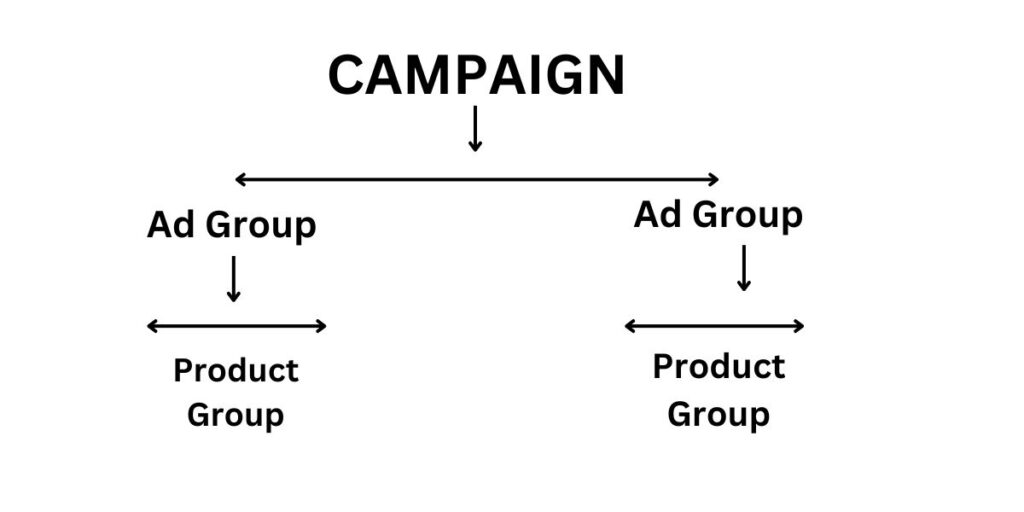
Setting the Foundation: Campaign and Ad Group Structure
Creating a new Shopping Campaign is your first step, but it’s the structure within your campaign that sets the stage for success. Organizing your ad groups effectively is vital. Ideally, each ad group should be dedicated to a specific product category or type. This level of granularity enables you to tailor your targeting and bidding strategies with precision.
Let’s dig deeper into this foundation-building process:
Creating a New Shopping Campaign: When creating your campaign, select the “Shopping” campaign type in Google Ads. You’ll be prompted to choose your campaign settings, including your campaign’s name, daily budget, and bidding strategy.
Organizing Ad Groups: Within your campaign, you’ll create ad groups. These are like thematic buckets for your products. For instance, if you’re selling clothing, you might create separate ad groups for “Men’s Apparel,” “Women’s Apparel,” and “Accessories.” Within each ad group, you’ll add the relevant products.
Segmenting Products: Effective segmentation is critical for precise targeting. Consider segmenting your products based on attributes like brand, price range, or product type. This segmentation allows you to allocate budgets and set bids according to the performance of each group.
By paying close attention to your campaign and ad group structure, you’ll lay the groundwork for more efficient and profitable campaigns.
Product Feed Optimization
Your product feed is the lifeblood of Google Shopping Campaigns. Think of it as the bridge between your e-commerce store and Google Ads. Google uses the information in your product feed to determine when and where to display your products in search results.
Here are some key aspects to consider when optimizing your product feed:
Quality Images: High-quality images are paramount. Ensure that your product images are clear, well-lit, and showcase your products from multiple angles if possible. Shoppers are more likely to click on listings with visually appealing images.
Detailed Descriptions: Your product descriptions should be informative and engaging. Highlight the key features and benefits of each product. Include essential details such as size, color, material, and any unique selling points.
Accurate Pricing: Keep your product prices up-to-date. Nothing frustrates potential customers more than clicking on a product only to find that the price has changed. Google may disapprove ads with inaccurate pricing.
Structured Data: Use structured data markup to provide Google with additional information about your products. This can enhance the visibility and richness of your product listings in search results.
Feed Optimization Tools: Consider using feed optimization tools or services to streamline the process. These tools can help you ensure that your product feed meets Google’s requirements and performs at its best.
Remember, your product feed is the foundation upon which your Shopping Campaigns are built. Take the time to optimize it thoroughly to maximize your campaign’s effectiveness.
Keyword and Negative Keyword Strategies
Keywords play a vital role in Google Ads. They are the words and phrases that trigger your ads to appear when customers search on Google. For Shopping Campaigns, selecting the right keywords for your products is essential. This often involves keyword research to identify popular search terms related to your items.
Choosing Relevant Keywords: Start by brainstorming a list of keywords that are relevant to your products. Think about what terms your potential customers might use when searching for products like yours.
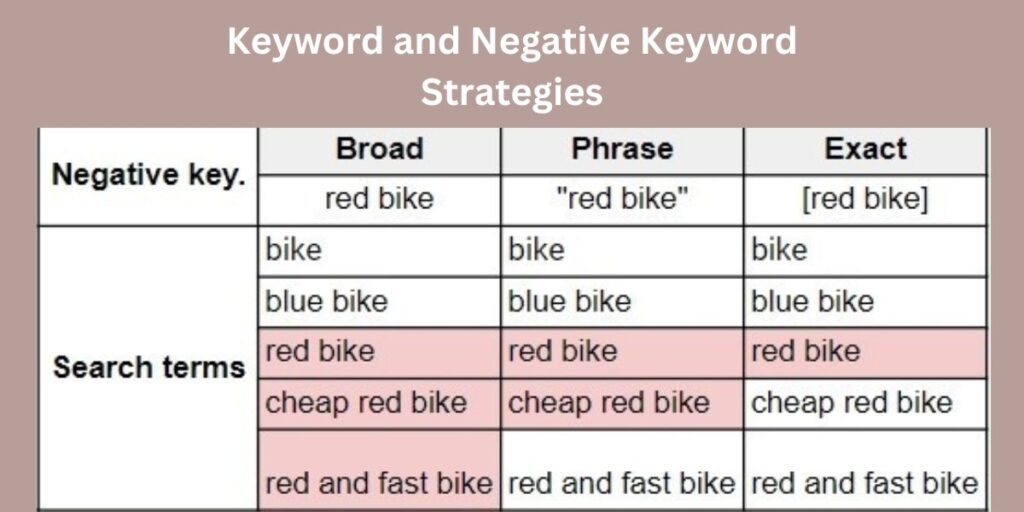
Keyword Match Types: Google Ads offers different keyword match types: broad match, phrase match, exact match, and broad match modifier. Each type has its advantages and considerations.
Broad Match: Your ads may show for a wide range of search queries related to your keywords.
Phrase Match: Your ads will show for searches that include your keyword phrase in the specified order.
Exact Match: Your ads will only show for searches that exactly match your keyword.
Broad Match Modifier: Allows for more control over broad match by specifying certain terms that must be present in the user’s query.
Negative Keywords: Negative keywords are equally important. These are keywords for which you do not want your ads to appear. For example, if you’re selling high-end luxury watches, you might add “cheap” or “affordable” as negative keywords to avoid clicks from users looking for budget options. Negative keywords help you refine your targeting and avoid irrelevant clicks that could drain your budget.
Effective keyword selection and management are ongoing processes. Regularly review your keyword performance and adjust your list as needed to improve campaign efficiency.
Bidding and Budget Management
Effective bidding is a cornerstone of successful Google Ads campaigns. While Google offers various bidding strategies, selecting the right one depends on your goals and budget. Here are some strategies to consider:
Manual Bidding: With manual bidding, you set the maximum amount you’re willing to pay for a click on your ad. This gives you full control over your bids but requires active monitoring and adjustment.
Enhanced CPC (eCPC): eCPC is a semi-automated bidding strategy that adjusts your manual bids based on the likelihood of a conversion. Google’s algorithms analyze historical data to make these adjustments.
Target ROAS (Return on Ad Spend): If you have a specific target for your return on ad spend, this strategy allows you to set a target ROAS percentage. Google will adjust your bids to help you achieve this goal.
Maximize Clicks: This strategy aims to get as many clicks as possible within your budget. It’s a good option if you’re focused on driving traffic to your site but should be used with caution, as it may not prioritize profitable clicks.
Budget Allocation: Determining how to allocate your budget among different campaigns and ad groups is a crucial consideration. High-performing campaigns may warrant higher budgets, while others may need adjustment or pausing if they’re not delivering results.
Bid Adjustments: Google Ads allows you to make bid adjustments based on various factors such as location, device type, and time of day. Use these adjustments strategically to fine-tune your targeting and budget allocation.
The key to successful bidding and budget management is continuous monitoring and adjustment. Be prepared to review your campaigns regularly, analyze their performance, and make changes to improve your ROI.
Ad Copy and Extensions
Crafting compelling ad copy is essential in attracting clicks and driving conversions. Your product titles and descriptions should not only be informative but also persuasive. Here are some tips for creating effective ad copy:
Clear and Concise Titles: Your product titles should be clear and concise. Use the most important keywords at the beginning of the title to catch the user’s attention. For example, “Designer Leather Handbag – 40% Off.”
Compelling Descriptions: In the description, highlight the key features and benefits of your product. Be concise but provide enough information to entice users to click. Mention any unique selling points, such as free shipping, discounts, or limited-time offers.
Call to Action (CTA): Include a strong call to action in your ad copy. Phrases like “Shop Now,” “Buy Today,” or “Limited Stock” can encourage users to take action.
Ad Extensions: Ad extensions are additional pieces of information that you can add to your ads to provide more value to potential customers. Google offers several types of ad extensions, including:
Sitelink Extensions: These allow you to include links to specific pages on your website, such as product categories or special promotions.
Callout Extensions: Callout extensions enable you to highlight key selling points or features, such as “Free Shipping” or “24/7 Customer Support.”
Structured Snippet Extensions: These extensions let you showcase specific aspects of your products or services, such as product categories or brands.
Use ad extensions strategically to enhance your ad’s visibility and appeal. Remember that the more information you provide in your ads, the more likely users are to click and convert.
Monitoring and Analytics
The success of your Google Ads Shopping Campaigns doesn’t end with setup. Continuous monitoring and data analysis are essential to fine-tune your campaigns and achieve optimal results. Let’s explore some key aspects of monitoring and analytics:
Key Metrics: Start by identifying the key performance metrics that matter most to your business. These may include:
Click-Through Rate (CTR): The percentage of users who click on your ads after seeing them.
Conversion Rate: The percentage of clicks that result in a desired action, such as a purchase.
Return on Ad Spend (ROAS): The ratio of revenue generated to the cost of advertising.
Impression Share: The percentage of impressions your ads receive compared to the total number of impressions they could potentially receive.
Average Position: The average position at which your ads appear in search results.
Conversion Tracking:Implement conversion tracking to measure user actions on your website after clicking on your ads. This might include tracking purchases, sign-ups, or other valuable interactions.
Google Analytics Integration: Integrate Google Ads with Google Analytics to gain deeper insights into user behavior on your site. You can track user paths, behavior flows, and more.
Performance Trends: Pay attention to performance trends over time. Are there certain days of the week or times of day when your campaigns perform better? Are there seasonal fluctuations in demand for your products?
A/B Testing: Experiment with A/B testing to compare different ad variations and landing pages. This can help you identify what resonates most with your audience and optimize your campaigns accordingly.
Effective monitoring and analytics require both the right tools and the right mindset. Regularly review your campaign performance, make data-driven decisions, and be prepared to adjust your strategies based on your findings.
Troubleshooting and Common Challenges
Expect challenges along the way. The world of online advertising is dynamic, and issues can arise that impact your campaigns. Here are some common challenges and strategies for overcoming them:
Low Click-Through Rate (CTR): If your CTR is low, it may be due to unappealing ad copy, poor targeting, or low-quality product images. Consider revising your ad copy, refining your targeting, and optimizing your product feed.
High Cost Per Click (CPC): A high CPC can eat into your budget quickly. Review your keyword strategy, ad quality, and landing page experience to see if there are opportunities to reduce costs while maintaining performance.
Low Conversion Rate: If your conversion rate is below expectations, evaluate your landing page experience. Ensure that your landing pages are relevant to the ads and provide a smooth, user-friendly experience. Test different landing page elements to improve conversion rates.
Competitive Pressure: In competitive industries, it can be challenging to maintain visibility without overspending. Consider long-tail keywords, niche targeting, and unique selling propositions to stand out from competitors.
Ad Disapprovals: Google Ads has strict policies, and ads that violate these policies may be disapproved. Review Google’s advertising policies to ensure compliance, and make necessary adjustments to your ads or landing pages.
Remember that troubleshooting is an ongoing process. As you encounter challenges, don’t get discouraged; view them as opportunities for improvement. Small adjustments can often lead to significant improvements in campaign performance.
Advanced Tips and Strategies
For those looking to take their Google Ads Shopping Campaigns to the next level, consider exploring advanced tactics and strategies. Here are a few advanced tips to consider:
Dynamic Remarketing: Dynamic remarketing allows you to show tailored ads to users who have previously visited your website or viewed specific products. This highly personalized approach can significantly boost conversion rates.
Audience Targeting: Explore audience targeting options to reach users who are more likely to convert. Use demographic, interest, and behavior-based targeting to fine-tune your audience segments.
Automation and Machine Learning: Google Ads offers automation features powered by machine learning. Experiment with automated bidding strategies and ad rotation to leverage Google’s algorithms for optimization.
Segmentation and Customization: Create highly segmented campaigns and ad groups to cater to different audience segments or product categories. Tailor your ad copy and bidding strategies to match each segment’s preferences and behaviors.
Competitor Analysis: Keep an eye on your competitors. Analyze their ad strategies, keywords, and landing pages to identify opportunities and threats. Tools like Google’s Auction Insights can provide valuable competitive insights.
Ad Testing: Continuously test different ad variations to identify what resonates best with your audience. Experiment with ad headlines, descriptions, images, and offers to optimize your click-through and conversion rates.
Conclusion
In conclusion, mastering the structure of your Google Ads Shopping Campaigns can be the key to e-commerce success. By following the strategies and tips outlined in this guide, you’ll not only establish a strong foundation but also have the tools to adapt and evolve your campaigns over time. Your e-commerce success story awaits!
Remember that success in Google Ads requires ongoing effort and adaptation. Stay vigilant, test different strategies, and always strive for improvement. As you implement these tactics, you’ll be well on your way to optimizing your campaigns, increasing your ROI, and growing your online business.
Additional Resources
For further learning and assistance, consider these resources:
If you have any questions or need personalized guidance, feel free to reach out to us.
How Can We Help?
Need help with Advanced Google Ads Management for your Business Growth? Contact us and let’s discuss about effective Google Ads strategy that will take your business to the next level!
LinkedIn Advertising Mastery Top 5 Best Practices for Success
In the world of digital marketing LinkedIn stands out as a goldmine for businesses and professionals seeking to connect, engage, and convert. With its massive user base of over 700 million professionals worldwide, LinkedIn offers a unique platform for advertisers to reach their target audience effectively. However, achieving success on LinkedIn requires more than just creating ads and hoping for the best. To truly excel and achieve a remarkable return on investment (ROI), you need to understand and implement Linkedin ads best practices.
Why LinkedIn Advertising Matters
Before delving into the best practices, let’s explore why LinkedIn advertising matters and why it should be a crucial component of your marketing strategy. LinkedIn provides an exceptional environment for advertisers:
Professional Audience: LinkedIn boasts a professional user base, making it ideal for B2B marketing and connecting with decision-makers.
Precise Targeting: The platform offers advanced targeting options, allowing you to reach the right people with your ads.
Engagement Opportunities: LinkedIn encourages engagement and interaction, making it a valuable platform for building brand relationships.
Top 5 LinkedIn Ads Best Practices.
1: Audience Targeting
Audience targeting is the cornerstone of successful LinkedIn advertising. To get the most out of your campaigns, you must precisely define your target audience. Here’s how:
Segmentation: Divide your audience into segments based on demographics, job titles, industries, and interests.
Use Matched Audiences: Leverage LinkedIn’s Matched Audiences feature to retarget website visitors, engage with your email list, and reach known contacts.
2: Compelling Ad Content
Creating compelling ad content is essential to capture your audience’s attention. Consider the following:
Engaging Copy: Craft concise and persuasive ad copy that speaks directly to your audience’s pain points and needs.
Eye-Catching Visuals: Incorporate captivating visuals, such as images and videos, to make your ads visually appealing.
3: Ad Bidding and Budgeting
Proper ad bidding and budgeting ensure that your advertising budget is optimized. Here’s how to approach it:
Bid Strategically: Adjust your bids based on your campaign objectives, competition, and audience.
Set a Realistic Budget: Allocate a budget that aligns with your goals and ensures consistent campaign performance.
4: A/B Testing and Optimization
A/B testing allows you to refine your ad campaigns for better results. Here’s how to implement it:
Test Ad Variations: Create multiple ad variations with small changes and analyze which ones perform best.
Continuous Optimization: Regularly review your campaigns and make adjustments based on
5: Tracking and Analytics
Tracking and analyzing ad performance is crucial for making data-driven decisions. Consider the following:
Key Metrics: Monitor metrics like click-through rate (CTR), conversion rate, and return on ad spend (ROAS).
LinkedIn Analytics: Utilize LinkedIn’s built-in analytics tools to gain insights into your campaign’s performance.
Common Mistakes to Avoid
While implementing best practices is essential, it’s equally important to avoid common pitfalls in LinkedIn advertising. Stay tuned for our next article, where we’ll explore these mistakes and how to steer clear of them.
Conclusion In this comprehensive guide, we’ve unveiled the top 5 best practices for LinkedIn advertising. Whether you’re a seasoned marketer or just beginning to explore the possibilities of LinkedIn ads, these strategies will equip you with the knowledge and techniques needed to master the platform and achieve your advertising goals. Don’t wait – start implementing these best practices and unlock the full potential of LinkedIn advertising for your business today.
How Can We Help?
Need help with Advanced Linkedin Ads Management for your Business Growth? Contact us and let’s discuss about effective digital marketing strategy that will take your business to the next level!